The TP-Link Tapo C210 is an indoor pan-and-tilt Wi-Fi security camera aimed squarely at buyers who want sharper-than-1080p video, motorized coverage of a whole room, and local storage, without paying a monthly fee just to see their footage. It sits in the affordable end of the home-security market, but on paper it punches above its price with a 2K (3-megapixel) sensor and a motor that lets it sweep across a room and tilt up and down on command.
It is a natural choice for keeping an eye on a living room, a nursery, a home office, or a pet while you are out. Because it stores video to a microSD card and supports open protocols like ONVIF and RTSP, it also appeals to people who want to fold a camera into an existing network video recorder rather than depend entirely on the cloud. Here is what the specifications tell us, and where the trade-offs lie.
Specifications at a glance
| Specification | Detail |
|---|---|
| Resolution | 2304 × 1296 (2K, 3MP) |
| Sensor | 1/2.8″ progressive-scan CMOS |
| Lens / field of view | 4 mm, F2.0, 98° diagonal |
| Pan / tilt | 360° pan coverage, 114° tilt coverage |
| Night vision | 850 nm IR LED, up to ~30 ft (9 m) |
| Audio | Two-way, with noise cancellation |
| Detection | Motion, person, and baby-cry detection; custom activity zones |
| Alarm | Sound and light siren |
| Storage | microSD up to 512 GB; optional Tapo Care cloud |
| Wi-Fi | 802.11b/g/n, 2.4 GHz |
| Standards | ONVIF, RTSP |
| Voice assistants | Amazon Alexa, Google Assistant |
Video quality and the motorized lens
The headline feature is the combination of a 2K sensor and a motor. The C210 captures 2304 × 1296 video, which TP-Link markets as 2K or 3MP. That is a meaningful step up from the many 1080p indoor cameras it competes with: the extra pixels give you more room to digitally zoom into a face, a doorway, or a license plate visible through a window before the image falls apart. The lens is a 4 mm F2.0 unit with a roughly 98-degree diagonal field of view, and the camera records at 15 fps by default with support up to 30 fps.
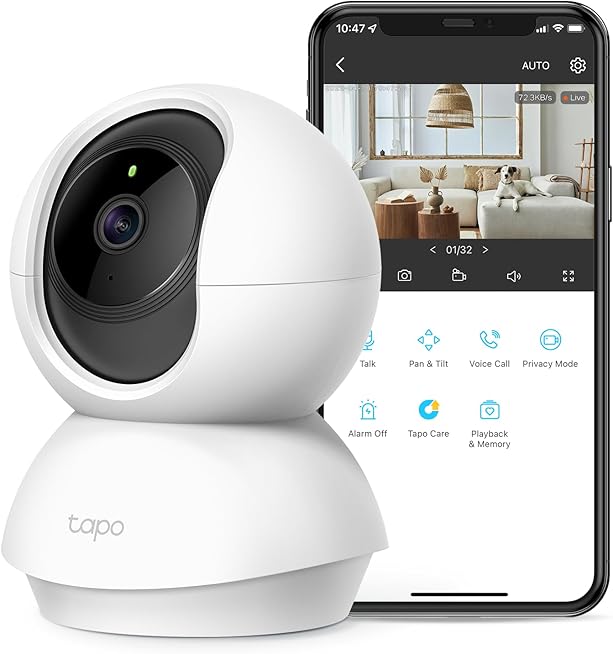
What sets a pan-tilt camera apart from a fixed one is coverage. The C210’s motor delivers a full 360-degree horizontal sweep and around 114 degrees of vertical tilt, so from a single spot it can watch an entire room rather than one cone. In the Tapo app you can swipe to steer the camera live, and you can save preset positions to jump between, for example the front door, the crib, and the back window, with a tap. That flexibility is the main reason to choose the C210 over a cheaper fixed model.
One honest caveat about all motorized cameras: because the lens can physically turn, privacy discipline matters. The C210 addresses this with a privacy mode that can point the lens away and stop streaming and recording when you are home, which is worth setting up if the camera lives in a living space.
Night vision, audio, and alerts
After dark, an 850 nm infrared LED provides night vision out to roughly 30 feet, rendered in the usual monochrome IR image. That is plenty for a bedroom, nursery, or average-sized living room, though like any IR camera it works best when the lens is not shooting straight through a window, which bounces the infrared back and washes out the picture.
Two-way audio is built in, with a microphone and speaker plus noise cancellation, so you can hear the room and speak back through the app, useful for telling a dog to get off the couch or reassuring a child. When the camera detects something, it can trigger a sound-and-light alarm to deter an intruder, and it pushes notifications to your phone. Detection is smarter than basic motion: the C210 supports person detection and baby-cry detection, and you can draw custom activity zones so you only get alerts for the parts of the frame you care about, cutting down on false pings from a ceiling fan or passing headlights.
Storage, privacy, and the no-subscription angle
Storage is where the C210’s value case gets strong. It accepts a microSD card up to 512 GB for local recording, which means continuous or event-based video with no ongoing cost. For buyers who resent monthly camera fees, that alone is a big draw. TP-Link also offers an optional Tapo Care cloud subscription for those who want off-site backup and richer event history, but it is genuinely optional rather than a gate in front of basic functionality.
For more advanced setups, the C210 supports ONVIF and RTSP, the standards that let a camera feed into third-party network video recorders and software like Blue Iris or a Synology NAS. That is unusual at this price and makes the C210 a favorite for tinkerers who want their footage inside a self-hosted system rather than a manufacturer’s app. Combined with the microSD slot and privacy mode, it gives you a camera you can run largely on your own terms.
Setup and daily use
Setup runs through the Tapo app on Android or iOS, and like most affordable smart-home gear the camera connects over 2.4 GHz Wi-Fi using 802.11b/g/n. There is no 5 GHz option, which is standard for this class and helps with range, but worth knowing if your network is configured around a single combined band. The camera is powered by an included DC adapter rather than a battery, so plan placement around a nearby outlet; this is a plug-in camera meant to stay in one spot, not a portable one.
Day to day, the Tapo app handles live view, playback of recorded clips, manual steering of the lens, preset positions, and notification settings. The C210 also links with Amazon Alexa and Google Assistant, so you can pull up the live feed on a compatible smart display by voice. If you are already running other TP-Link gear, it slots neatly alongside products like the Kasa Smart Plug Mini for a coherent connected-home setup managed from your phone.
Pros and cons
Strengths
- 2K (2304 × 1296) resolution beats the many 1080p indoor cameras it competes with
- Motorized 360° pan and ~114° tilt covers a whole room from one location
- Local microSD recording up to 512 GB with no required subscription
- ONVIF and RTSP support for third-party NVRs and self-hosted setups
- Smart alerts: person and baby-cry detection plus custom activity zones
- Two-way audio, IR night vision to ~30 ft, and a sound-and-light alarm
Limitations
- Indoor only and plug-powered, so placement is tied to an outlet
- 2.4 GHz Wi-Fi only
- Default 15 fps capture is fine for monitoring but not silky-smooth motion
- A motorized lens demands attention to privacy-mode settings in living spaces
- Richer cloud event history requires the paid Tapo Care plan
Who it’s for (and who should look elsewhere)
The C210 is a strong pick for anyone who wants an affordable indoor camera with better-than-1080p detail, room-wide motorized coverage, and the freedom to store footage locally without a subscription. It suits nurseries, pet monitoring, home offices, and general room security, and it is especially appealing to buyers who want ONVIF/RTSP so the camera can join an existing surveillance system.
Look elsewhere if you need an outdoor or battery-powered camera (TP-Link’s Tapo C320WS and battery-powered models fit those roles better), or if you are committed to Apple HomeKit, which the C210 does not natively target. Worth cross-shopping are the Wyze Cam Pan v3, which adds outdoor tolerance at a similar price, and the Ring Indoor Cam for households already invested in Ring, though Ring leans harder on subscriptions. Within TP-Link’s own range, the C210 is the sweet spot: the cheaper C200 drops to 1080p, while pricier Tapo models add higher frame rates or outdoor ratings.
Frequently asked questions
Does the Tapo C210 require a subscription?
No. It records to a microSD card of up to 512 GB for local storage at no ongoing cost. A Tapo Care cloud plan is available if you want off-site backup and extended event history, but it is optional.
What resolution does it record?
It captures 2304 × 1296, which TP-Link markets as 2K or 3MP, using a 1/2.8-inch sensor. That is noticeably sharper than the common 1080p indoor cameras in its price bracket.
Can it cover an entire room?
Yes. The motorized head provides a full 360° of horizontal pan coverage and about 114° of tilt, and you can save preset positions to jump between key spots in the Tapo app.
Does it work with Alexa or Google Assistant?
Yes. The C210 is compatible with both Amazon Alexa and Google Assistant, so you can view the live feed on a supported smart display by voice. It is not aimed at Apple HomeKit.
Can I use it with a third-party NVR?
Yes. The camera supports ONVIF and RTSP, so it can feed into compatible network video recorders and self-hosted software such as Blue Iris or a NAS-based system.
Bottom line
The TP-Link Tapo C210 delivers an unusually complete feature set for a budget indoor camera: 2K video, motorized whole-room coverage, subscription-free local recording, smart person and baby-cry detection, and ONVIF/RTSP support for people who want to run their own surveillance stack. Its limits are the predictable ones for the price, indoor-only, plug-powered, and 2.4 GHz Wi-Fi, but none of them undercut the core value. For monitoring a room, a nursery, or a pet without locking yourself into monthly fees, it is one of the easiest recommendations in its class, and it fits naturally into a wider smart home that might also include a eufy RoboVac 11S MAX and the best streaming devices for home entertainment.