The Kasa Smart Wi-Fi Plug Mini is TP-Link’s entry-level way to make an ordinary lamp, fan, coffee maker, or space heater controllable from your phone or voice assistant. It is a single-outlet Wi-Fi smart plug built around one simple idea: keep the hardware small, keep the setup painless, and keep the price low enough that buying two or three at once does not sting. In the Kasa line-up the “Mini” name has been carried by a few model numbers over the years, most recently the EP10, which TP-Link markets as the smallest plug it has ever made.
If you are just getting started with home automation, or you want to add a handful of controllable outlets without committing to a hub, this is one of the most straightforward products in the category. It is not the plug to buy if energy monitoring is your priority (that feature lives on Kasa’s Slim KP125 and older HS110 models), but for on/off control, scheduling, and voice commands, the Mini covers the fundamentals well.
Specifications at a glance
| Specification | Detail |
|---|---|
| Model referenced | Kasa Smart Wi-Fi Plug Mini (EP10) |
| Maximum load | 15 A |
| Maximum power | 1800 W (resistive loads) |
| Input voltage | 100–120 V AC |
| Wi-Fi | 802.11b/g/n, 2.4 GHz only |
| Voice assistants | Amazon Alexa, Google Assistant |
| App | Kasa Smart (Android 5.0+ / iOS 10.0+) |
| Energy monitoring | No (see Kasa Slim KP125 for that feature) |
| Key features | Scheduling, auto-off timer, Away Mode, device grouping |
| Safety | UL certified, flame-retardant housing |
Design and what “Mini” actually means
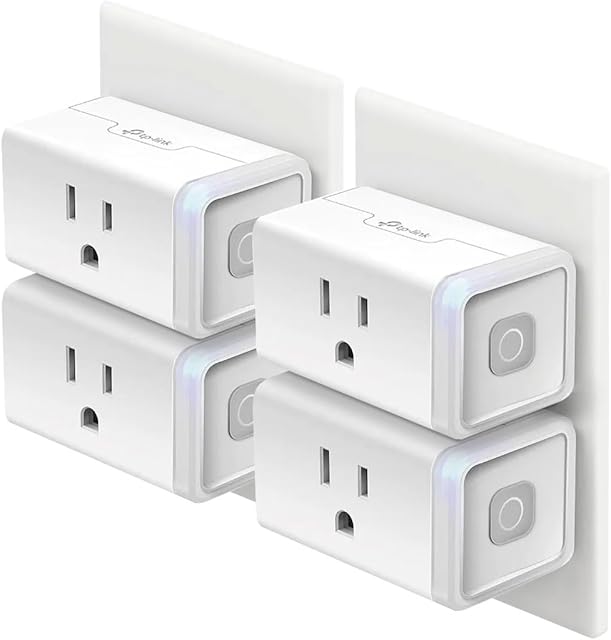
The whole reason this plug exists is its footprint. TP-Link describes the EP10 as its smallest plug to date, and the compact body is the feature buyers notice first. On a standard duplex wall outlet, a bulky smart plug will block the second socket entirely; the Mini is shaped and sized so that two units can share the same outlet, one above the other. That matters more than it sounds, because a lot of the appeal of smart plugs is putting them in pairs, one for a lamp and one for a fan, for example, without losing an entire receptacle.
The housing is UL certified and made from flame-retardant material, which is the baseline you want from anything carrying up to a 15-amp load. There is a physical control button on the side, so you can toggle whatever is plugged in without reaching for your phone, and a small status LED confirms connection state. There is no ground pin pass-through concern to worry about for typical lamp-and-appliance use, but as always with any plug rated to 1800 W, match the load sensibly: it is designed for lamps, small appliances, and electronics rather than, say, a high-draw electric heater running continuously at its ceiling.
Setup, app, and everyday control
Setup runs through the Kasa Smart app on Android or iOS. The process is the familiar smart-home routine: plug the unit in, open the app, let it find the plug, and join it to your home network. The single most important thing to know before you buy is the radio: the Mini connects over 2.4 GHz Wi-Fi only, using 802.11b/g/n. That is completely normal for smart plugs and actually helps with range, but if your router hides the 2.4 GHz band behind a single combined network name, you may need to separate the bands or follow Kasa’s guidance during pairing. No hub is required; the plug talks directly to your router.
Once it is on the network, the app gives you remote on/off from anywhere, plus the scheduling tools that make a smart plug genuinely useful rather than a novelty. You can set schedules by time of day, use sunrise and sunset as triggers so a lamp comes on as it gets dark, set an auto-off timer so a curling iron or heater shuts itself down after a set period, and group several Kasa devices to switch together. Away Mode turns lights on and off at varying times to give an occupied look while you are traveling, which is a small but practical security touch.
Because the Mini is a mainstream Kasa product, it plays nicely with the wider ecosystem. You can build scenes and automations that mix it with Kasa smart bulbs and switches, and control everything from one app rather than juggling several. That consistency is one of the quieter reasons people stick with Kasa once they own a couple of devices.
Voice control and smart-home integration
The Mini works with both Amazon Alexa and Google Assistant, so once it is linked you can say “turn on the living room lamp” and have it respond. That covers the two assistants most households already use through an Echo or Nest speaker. It is worth checking the exact ecosystem support for the specific model and firmware you buy: TP-Link’s Matter-compatible plug is the Slim KP125M, and if cross-platform Matter support or Apple Home compatibility is a hard requirement, that is the model to look at rather than the standard Mini. For an Alexa or Google household that simply wants reliable voice on/off, the Mini is a natural fit.
Reliability is the metric that matters most for a plug you will forget about, and Kasa’s long track record in this category is a big part of the value. On paper the feature set is unremarkable in the best way: it does the handful of things a smart plug should do, and it does them without demanding a subscription or a separate bridge.
Where energy monitoring fits in
This is the one area where buyers get tripped up, so it deserves a clear answer. The standard Kasa Smart Plug Mini does not measure the wattage or kilowatt-hours of whatever is plugged into it. Some Kasa models expose basic runtime statistics (how many hours the plug was on today, this week, and this month), but that is usage time, not power consumption. If your goal is to see how many watts your space heater or entertainment center actually draws, you want the Kasa Smart Wi-Fi Plug Slim with Energy Monitoring (KP125), which is rated to the same 15 A / 1800 W ceiling but adds real-time and historical power tracking in the app. Buying the Mini expecting energy data is the most common mismatch with this product.
Pros and cons
Strengths
- Genuinely compact, so two units can share one duplex outlet without blocking each other
- Straightforward hub-free setup over standard 2.4 GHz Wi-Fi
- Solid scheduling toolkit: time, sunrise/sunset, auto-off timer, and Away Mode
- Works with both Alexa and Google Assistant
- UL certified with a 15 A / 1800 W rating and flame-retardant housing
- Fits into the broader Kasa ecosystem for grouped scenes and automations
Limitations
- No energy monitoring on the standard Mini (KP125 Slim adds it)
- 2.4 GHz Wi-Fi only, which can complicate setup on some combined-band routers
- Standard Mini is not Matter-certified; look to the KP125M for Matter/Apple Home
- Single outlet per unit, so whole-room control means buying several
Who it’s for (and who should look elsewhere)
The Mini is aimed at anyone taking their first steps into a smart home, or an existing user who just needs a few more controllable outlets for lamps, fans, holiday lights, or a coffee maker on a morning schedule. If you live in an Alexa or Google household and want dependable voice on/off plus simple automations, it is an easy recommendation and pairs well with a broader connected-home setup, whether that is smart lighting or a robot vacuum like the eufy RoboVac 11S MAX handling the floors.
Look elsewhere if you specifically need power measurement (choose the Kasa Slim KP125), if you are building around Apple Home or want future-proof Matter support (choose the KP125M), or if you need outdoor rating for patio lights (Kasa’s outdoor plugs are built for that). Competing options worth cross-shopping include the Amazon Smart Plug, which is the most seamless choice for a pure-Alexa home, and the Wyze Plug, another budget-friendly pick. Within Kasa’s own range, the difference between the Mini, the Slim, and the outdoor models is mostly about energy monitoring, Matter, and weatherproofing rather than core control.
Frequently asked questions
Does the Kasa Smart Plug Mini need a hub?
No. It connects directly to your home Wi-Fi router over the 2.4 GHz band, so there is no separate bridge or hub to buy. You only need the free Kasa Smart app and a 2.4 GHz network.
Can it monitor energy use?
The standard Mini does not report wattage or kilowatt-hours. For real-time and historical power consumption, choose the Kasa Smart Wi-Fi Plug Slim with Energy Monitoring (KP125), which shares the same 15 A / 1800 W rating.
Will it work with Alexa and Google Assistant?
Yes. The Mini is compatible with both Amazon Alexa and Google Assistant for voice on/off once you link it in the respective app. For Apple Home or Matter, look at the KP125M instead.
What can I safely plug into it?
It is rated for up to 15 A and 1800 W on resistive loads, which comfortably covers lamps, fans, small kitchen appliances, and electronics. Match high-draw devices to that ceiling and avoid overloading it.
Why won’t it connect during setup?
The most common cause is the network band. The plug uses 2.4 GHz Wi-Fi only, so if your router broadcasts one combined network name you may need to temporarily separate the bands or follow Kasa’s in-app pairing steps to point the plug at the 2.4 GHz network.
Bottom line
The Kasa Smart Wi-Fi Plug Mini is a dependable, genuinely compact smart plug that nails the basics: easy hub-free setup, flexible scheduling, Away Mode, and voice control with Alexa and Google Assistant, all backed by TP-Link’s long history in the category. Just buy it for what it is. If you need energy monitoring or Matter, step up to the Slim KP125 or KP125M; if you simply want reliable app and voice control of a lamp or appliance without fuss, the Mini remains one of the safest budget picks around. It also makes a natural building block alongside other connected gear, from a TP-Link Tapo C210 security camera to the best streaming devices for home entertainment.