The VIZIO V-Series 2.0 Sound Bar (model V20-J8) is a compact, entry-level home-theater speaker built to do one thing well: make a flat-panel TV sound dramatically better without complicating your living room. At roughly two feet wide, with a simple two-channel design, it is aimed squarely at people who find their television’s built-in speakers thin or hard to understand, but who do not want the cost, cabling, or clutter of a full surround system.
It is a budget product, and it is honest about that. There is no separate subwoofer, no wireless rear speakers, and no up-firing height drivers. What you get instead is a straightforward stereo bar with virtual-surround processing, a handful of useful inputs, and Bluetooth for music. For a small room, a bedroom, or a second TV, that focused approach is exactly the point. Here is how the specifications translate into everyday use.
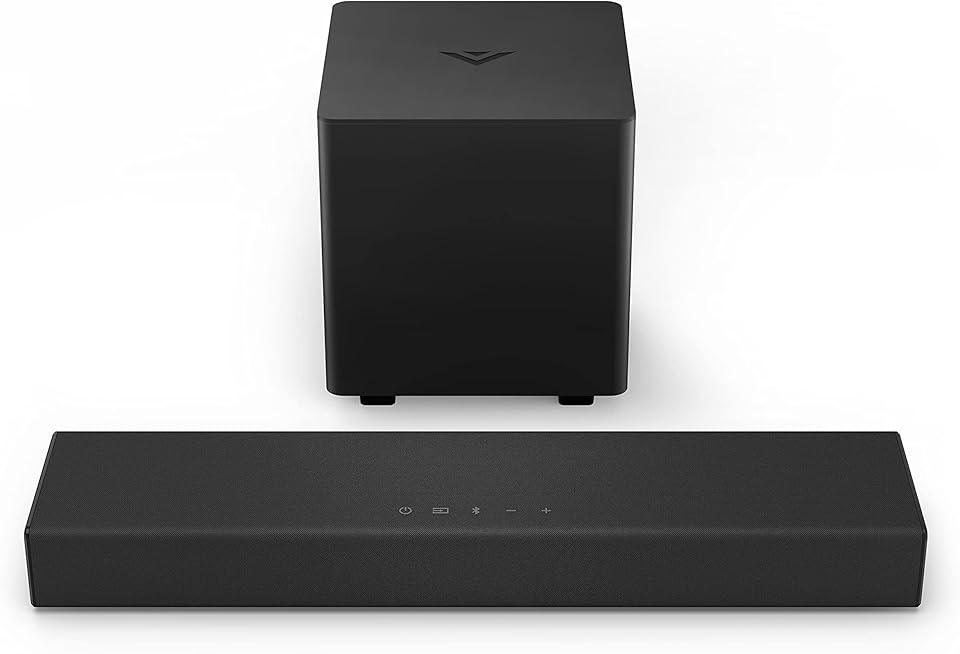
Specifications at a glance
| Feature | VIZIO V-Series 2.0 (V20-J8) |
|---|---|
| Channels | 2.0 (stereo, no separate subwoofer) |
| Speakers | 2 full-range drivers |
| Width | About 24 inches (compact form factor) |
| Frequency response | Approximately 70 Hz – 20 kHz |
| Rated loudness | Up to about 95 dB |
| Audio processing | Dolby Audio, DTS Virtual:X |
| Inputs | HDMI ARC, optical (Toslink), 2x 3.5 mm analog, USB (WAV playback) |
| Wireless | Bluetooth streaming |
| Voice assistant | Works with Alexa, Google Assistant, and Siri via a connected device |
| Remote | Included |
| Weight | About 3.84 lb |
Sound and processing: what a 2.0 bar can and can’t do
The V20-J8 uses two full-range drivers in a single cabinet, arranged as a 2.0 stereo system. The quoted frequency response reaches down to about 70 Hz, which is respectable for a compact bar with no dedicated subwoofer. In plain terms, that means you get clear midrange and treble, noticeably better dialogue intelligibility than most TV speakers, and some lower-end presence, but not the deep, physical bass that a separate sub would add. For news, sitcoms, dialogue-heavy dramas, and general viewing, that balance is well judged; for bass-heavy action films, you will notice the missing low end.
To broaden the soundstage, the bar includes DTS Virtual:X, a processing mode that simulates a more spacious, quasi-surround effect from a single front-mounted unit. It cannot literally place sound behind you the way discrete rear speakers can, but it does help the audio feel wider and taller than the cabinet’s size suggests. Dolby Audio decoding is also on board, so standard Dolby soundtracks from your TV and streaming apps are handled correctly.
The rated loudness of around 95 dB is enough to comfortably fill a small or medium room. This is not a bar designed to pressurize a large open-plan space, and pushing any compact speaker to its limits invites strain, but at sensible living-room volumes it has clear headroom over typical built-in TV speakers.
Connections and everyday flexibility
For a budget bar, the input selection is generous. The primary connection is HDMI ARC, which is the modern, tidy way to link a soundbar to a TV: a single cable carries audio from the television, and it lets your existing TV remote control the soundbar’s power and volume. That last detail matters for ease of use, because it means you rarely need to juggle two remotes day to day, even though a dedicated remote is included in the box.
Beyond HDMI ARC, there is an optical (Toslink) input for older or ARC-less TVs, two 3.5 mm analog inputs for legacy sources, and a USB port for WAV audio playback from a thumb drive. Bluetooth rounds out the list, letting you stream music wirelessly from a phone, tablet, or computer, which turns the bar into a simple music speaker between viewing sessions. VIZIO also lists compatibility with the major voice assistants (Alexa, Google Assistant, and Siri) when used alongside a compatible device, so it can fit into a broader smart-home routine.
This spread of inputs is one of the bar’s quiet strengths. It means the V20-J8 can improve the sound of nearly any setup, from a current 4K TV to an older set, and it pairs naturally with a streaming player feeding the same television. If you are adding a streamer at the same time, our reviews of the Roku Express 4K+ and the Amazon Fire TV Stick 4K cover two popular options that connect to your TV and route their audio to the bar over HDMI ARC.
Design, size, and setup
At around 24 inches wide and under four pounds, the V20-J8 is deliberately small. It slots neatly beneath compact televisions, roughly 32 to 50 inches, without overwhelming the stand, and its low profile is unlikely to block the bottom of the screen or an infrared sensor. It can also be wall-mounted for a cleaner look. The light weight makes it easy to reposition, and it is a sensible size for a bedroom, dorm, office, or apartment where a large bar with a separate subwoofer would be impractical.
Setup is designed to be quick. With a single HDMI cable to a TV’s ARC port, most people can be up and running in a few minutes, and the on-bar controls plus the included remote handle input switching, volume, Bluetooth pairing, and the sound modes. Because it draws relatively little power and has a small footprint, it is an easy addition to an existing setup rather than a project.
Pros and cons
Strengths
- Big, clear upgrade over built-in TV speakers, especially for dialogue
- Compact 24-inch cabinet suits small rooms and smaller TVs
- HDMI ARC lets your TV remote control power and volume
- Generous inputs for the price: HDMI ARC, optical, dual 3.5 mm, and USB
- Bluetooth streaming and DTS Virtual:X virtual-surround processing included
- Remote included, and it is light enough to wall-mount easily
Limitations
- No separate subwoofer, so deep bass is limited
- 2.0 stereo only; virtual surround is a simulation, not true rear channels
- Not designed to fill large or open-plan rooms at high volume
- No Dolby Atmos or true object-based height audio
- Best suited to compact TVs; larger screens may want a wider bar
Who it’s for (and who should look elsewhere)
The V-Series 2.0 is ideal for anyone who wants a meaningful, no-fuss sound upgrade in a small space for as little money as possible. Bedrooms, guest rooms, dorms, home offices, and second TVs are its natural homes, and it is a great match for viewers whose main frustration is muddy dialogue rather than a craving for cinematic bass.
Buyers who want room-shaking low end or a more immersive experience should look at a bar that includes a subwoofer, such as VIZIO’s own V-Series 2.1 or a step-up 5.1 system, or a bar with Dolby Atmos height channels if a true surround effect is the goal. Larger living rooms and bigger TVs will also be better served by a wider, more powerful bar. But if the brief is “make my small TV sound clearly better without spending much,” the V20-J8 is squarely on target. To complete the setup, pair it with a streamer from our roundup of the best streaming devices for home entertainment in 2026.
Frequently asked questions
Does the V-Series 2.0 come with a subwoofer?
No. It is a 2.0 system, meaning two full-range speakers in a single bar with no separate subwoofer. It reaches down to roughly 70 Hz on its own, which improves clarity and adds some low-end presence, but for deep, physical bass you would want a 2.1 model with a dedicated sub.
How does it connect to my TV?
The best option is HDMI ARC, which uses one cable and lets your TV remote control the bar’s volume and power. If your TV lacks an ARC port, you can use the optical input instead, or one of the 3.5 mm analog inputs for older equipment.
Can I use it to play music from my phone?
Yes. It has Bluetooth, so you can stream music wirelessly from a phone, tablet, or computer. There is also a USB port for playing WAV audio files from a flash drive.
Is it big enough for my television?
At about 24 inches wide, it is best suited to compact TVs in roughly the 32-to-50-inch range and to small or medium rooms. On a very large screen in a big space, a longer, more powerful soundbar would be a better visual and acoustic match.
Does it support Dolby Atmos?
No. It supports Dolby Audio and DTS Virtual:X, the latter of which simulates a wider, more surround-like effect from the single bar. It does not include the up-firing drivers or object-based processing needed for true Dolby Atmos height effects.
Bottom line
The VIZIO V-Series 2.0 (V20-J8) is a sensible, honest budget soundbar that delivers exactly what its specifications promise: clearer, fuller TV audio in a compact package, with a surprisingly complete set of inputs and Bluetooth thrown in. Its limits, no subwoofer, stereo-only channels, and simulated rather than true surround, are the expected trade-offs at this price and size. For a small room or a secondary TV where clarity matters more than cinematic bass, it is an easy, affordable recommendation. Anyone chasing deep bass or genuine surround should budget for a 2.1 or Atmos-capable system instead.