The Soundcore P20i is Anker’s entry-level pair of true wireless earbuds, sitting near the bottom of a lineup that stretches up to noise-cancelling flagships. It is aimed squarely at the shopper who wants recognizable brand backing, an actual companion app, and a full day of battery life without spending flagship money. In a market flooded with anonymous no-name buds, the P20i is one of the more sensible budget picks because it comes from a company with a track record in charging and audio accessories.
These are not premium earbuds and they do not pretend to be. There is no active noise cancellation, no wireless charging, and no high-resolution codec. What the P20i offers instead is a focused set of features that cover the essentials well on paper. Below we break down the published specifications and what they realistically mean for everyday listening, calls, workouts, and commuting.
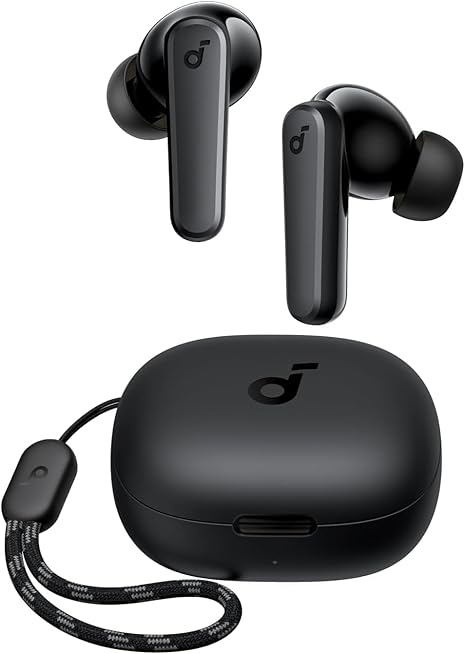
Specifications at a glance
| Feature | Detail |
|---|---|
| Drivers | 10 mm dynamic drivers |
| Bluetooth | Bluetooth 5.3 |
| Codecs | SBC, AAC |
| Battery (earbuds) | Up to 10 hours per charge |
| Battery (with case) | Up to 30 hours total |
| Quick charge | 10 minutes for about 2 hours of playtime |
| Charging port | USB-C |
| Water resistance | IPX5 (earbuds only, not the case) |
| Microphones | 2 mics with AI-assisted call noise reduction |
| App | soundcore app with 22 EQ presets and control customization |
| Controls | Customizable touch controls; single-earbud mono mode |
Sound and tuning
The P20i relies on a single 10 mm dynamic driver in each earbud. That is a fairly large driver for the category, and larger diaphragms generally have an easier time moving air for low-end response. Anker markets these buds on their bass output, and on paper the driver size supports that claim. Budget earbuds almost always ship with a warm, bass-forward default tuning because it flatters mainstream pop, hip-hop, and electronic music through small drivers, and buyers of the P20i should expect that character out of the box.
The more interesting part is the soundcore app. It exposes 22 EQ presets plus the ability to nudge the tuning yourself, which is unusual at this price. If the stock signature is too heavy in the low end, you can pull the bass back and lift the treble for more clarity on vocals and acoustic tracks. That level of control is what separates a branded budget product like this from generic earbuds, which typically offer no adjustment at all. Codec support is limited to SBC and AAC, so there is no LDAC or aptX high-bitrate streaming. AAC is the codec iPhones use, and it is perfectly serviceable for casual listening; Android users simply fall back to SBC, which is universal but more basic.
It is worth being realistic about expectations. For the money, the specifications point to a competent, punchy, consumer-friendly sound rather than an audiophile experience. The absence of ANC also means these do nothing to actively block outside noise, so the passive seal from the ear tips is what determines how much of the world you tune out.
Comfort, fit, and controls
The P20i uses a conventional in-ear design with silicone tips and a short stem. That shape tends to sit securely for most ears and is easy to seat one-handed. A good seal matters more here than on ANC models because it is your only barrier against ambient noise and it directly affects perceived bass. Anker includes multiple tip sizes in the box, which is the standard way to dial in fit; trying each size is the single most effective thing a buyer can do to improve both comfort and sound.
Controls are touch-based and, importantly, customizable through the app. Out of the box the tap gestures handle play/pause, track skipping, and calls, and you can reassign functions to suit how you actually use them. There is also a single-earbud mono mode: pull one bud from the case and it works on its own, which is handy for phone calls or for staying aware of your surroundings while walking or cycling. The IPX5 rating on the earbuds means they are built to shrug off sweat and rain, making them a viable gym and running companion. Note that the charging case does not carry that rating, so it should be kept dry.
Battery and charging
Battery life is one of the P20i’s strongest specifications. Anker quotes up to 10 hours from the earbuds themselves and up to 30 hours in total once you factor in the charging case. Ten hours in the buds is genuinely long for true wireless earbuds; many pricier models land closer to five or six hours per charge, so the P20i should comfortably survive a full workday or a long-haul flight before the buds need to return to the case.
The case tops up over USB-C, which is the modern standard and means one cable for the buds and most other devices. There is a quick-charge feature too: roughly 10 minutes in the case delivers about two hours of listening, which is the sort of margin that rescues you on the way out the door. The one omission is wireless charging, which is common to skip at this price. For most buyers, the combination of long per-charge life and USB-C fast top-ups is more useful day to day than a Qi pad would be.
Connectivity and calls
Connection duties are handled by Bluetooth 5.3, a recent and efficient version of the standard that helps with stable pairing and power draw. In practical terms that should translate to reliable connections to phones, tablets, and laptops, and low latency for casual video watching, though the P20i is not marketed with a dedicated low-latency gaming mode.
For calls, the P20i uses two microphones per set combined with an AI-based algorithm that Anker says isolates your voice from background noise. Dual-mic arrays with noise reduction are now common on budget buds and tend to be adequate for calls in quiet-to-moderate environments, though wind and busy streets remain challenging for any earbud at this price. If you spend a lot of time on calls, the app-based tuning and the mono mode both help by letting you keep one ear open.
Pros and cons
Strengths
- Long battery life: up to 10 hours in the buds and 30 hours with the case
- USB-C charging with a fast 10-minute top-up for roughly 2 hours of play
- Large 10 mm drivers with a bass-focused, crowd-pleasing tuning
- A real companion app with 22 EQ presets and customizable touch controls
- IPX5 sweat and water resistance on the earbuds for gym use
- Bluetooth 5.3 and a single-earbud mono mode
Limitations
- No active noise cancellation
- No wireless charging; the case itself is not water resistant
- Codec support limited to SBC and AAC (no LDAC or aptX)
- Bass-forward default tuning may need EQ adjustment for some listeners
Who it’s for (and who should look elsewhere)
The P20i makes the most sense for budget-conscious buyers who still want a trusted brand, a working app, and long battery life. Students, gym-goers, and anyone who wants a cheap, replaceable pair of buds for commuting will get the core features that matter without paying for extras they may not use. The IPX5 rating and secure in-ear fit make them a reasonable workout option, and the 30-hour total battery is a standout at this tier.
Shoppers who need active noise cancellation for flights or open offices should look at a step-up model instead. Deep in Apple’s ecosystem, the Apple AirPods (2nd Generation) offer effortless iPhone pairing and hands-free Siri, though at a higher price and with a shorter per-charge battery. Within Anker’s own range, the noise-cancelling Soundcore Life or Liberty models add ANC for more money. If you want to see how the P20i stacks up against the rest of the value field, our roundup of the best budget wireless earbuds in 2026 puts several rivals side by side. And if your budget stretches to a speaker for the home instead of buds, the Anker Soundcore 2 comes from the same brand family.
Frequently asked questions
Do the Soundcore P20i have noise cancellation?
No. The P20i does not include active noise cancellation. Any isolation you get comes from the passive seal of the ear tips, so choosing the right tip size is important. The AI noise reduction Anker mentions applies to your outgoing voice on calls, not to what you hear during music playback.
How long does the battery last?
Anker rates the earbuds at up to 10 hours of playback on a single charge and up to 30 hours total when you include the charging case. A quick 10-minute charge in the case provides roughly two hours of listening.
Can I use just one earbud at a time?
Yes. The P20i supports a single-earbud mono mode. Taking one bud out of the case lets you use it on its own, which is useful for calls or for staying aware of traffic and announcements.
Are they waterproof enough for the gym?
The earbuds carry an IPX5 rating, which covers sweat and splashes of water, making them suitable for workouts and light rain. The charging case is not rated for water, so keep it dry.
Do they work with iPhone and Android?
Yes. They use standard Bluetooth 5.3 and support the AAC codec used by iPhones as well as SBC, which every device supports. The soundcore app is available for both platforms for EQ and control customization.
Bottom line
On paper, the Soundcore P20i delivers a lot of the fundamentals for very little money: big 10 mm drivers, 30 hours of total battery, USB-C fast charging, IPX5 sweat resistance, and a genuinely useful app with 22 EQ presets. The compromises are the ones you expect at this price, namely no ANC, no wireless charging, and basic codec support. For a first pair of true wireless earbuds, a gym backup, or a low-risk everyday set from a brand that stands behind its products, the P20i looks like one of the more sensible budget choices available.