The phrase “smart home” makes a lot of people picture a wall of tablets, a rewired house, and a monthly bill. In reality, the most useful version of a connected home is far more modest: a few inexpensive gadgets that solve small, real annoyances, all controlled from the phone that is already in your pocket. You do not need to be technical, you do not need to buy everything from one brand, and you almost never need to touch your home’s wiring.
This guide walks through five beginner-friendly upgrades in the order most people should tackle them, plus the handful of concepts, Wi-Fi bands, hubs, voice assistants, Matter, and privacy, that make the difference between a setup that just works and one that frustrates you. The goal is a home that quietly does a few things automatically, not a hobby that eats your weekends. Along the way we link to specific product reviews so you can see how the ideas translate into real hardware.
Start with the concepts, not the catalog
Before buying anything, it helps to understand five ideas that come up constantly in smart-home shopping. Getting these straight now prevents the two most common beginner headaches: a device that will not connect, and an ecosystem that will not talk to itself.
2.4 GHz Wi-Fi is the smart-home band. The overwhelming majority of affordable smart-home gadgets, plugs, bulbs, sensors, and many cameras, connect only to the 2.4 GHz Wi-Fi band, not the faster 5 GHz band. That is deliberate: 2.4 GHz travels farther and penetrates walls better, which matters more than raw speed for a device that sends tiny amounts of data. The practical catch is that many modern routers combine both bands under one network name. During setup your phone may be sitting on 5 GHz while the gadget needs 2.4 GHz, and pairing fails. If a device refuses to connect, temporarily separating the bands (or following the app’s guidance to force 2.4 GHz) fixes it the vast majority of the time.
Hub vs. no-hub. Some devices talk directly to your Wi-Fi router and need nothing else, most smart plugs and Wi-Fi cameras work this way. Others use low-power radios like Zigbee, Z-Wave, or Thread and need a small “hub” or “bridge” that translates between those radios and your network. For a beginner, Wi-Fi devices are the simplest starting point because there is no extra box to buy. Hubs earn their keep later, when you own a dozen sensors and want them to run reliably without hammering your Wi-Fi, but you can happily ignore them for your first few purchases.
Alexa, Google, and the voice layer. Amazon Alexa and Google Assistant are the two mainstream voice ecosystems (Apple Home is a third, smaller option). A smart speaker or display is what lets you say “turn off the living room lamp” instead of opening an app. You do not need one to get started, every device has its own phone app, but a single Echo or Nest speaker ties everything together and makes routines feel effortless. Pick the one that matches the phones and speakers you already use.
Matter is the new common language. Matter is an industry standard designed so that devices from different brands work together regardless of which app or voice assistant you prefer. A Matter-certified plug, for example, can be added to Alexa, Google Home, and Apple Home at the same time. It is still maturing, but when two similar products cost about the same, choosing the Matter-certified one is a sensible hedge against being locked into a single brand.
Privacy is a setting, not an afterthought. Anything with a microphone or camera deserves a moment’s thought about where its data goes. We come back to this at the end, but keep it in mind as you read: the right product plus the right settings is what keeps a convenience from becoming a liability.
Upgrade 1: A smart plug (the perfect first purchase)
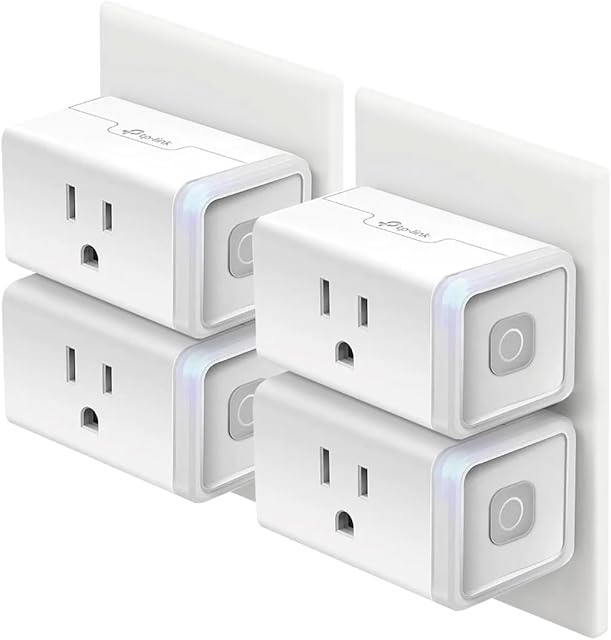
If you buy one thing, buy a smart plug. It is the cheapest, lowest-risk way to understand how the whole category works, and it instantly makes any “dumb” lamp, fan, coffee maker, or space heater controllable from your phone or voice. There is nothing to install, you plug it into the wall, plug your device into it, and pair it in an app in a couple of minutes.
A good entry point is the Kasa Smart Plug Mini. TP-Link’s Kasa line is one of the most established in the category, and the Mini is built around the fundamentals: a compact body sized so two units can share a standard duplex outlet without blocking each other, a 15 A / 1800 W load rating suitable for lamps and small appliances, and connection over 2.4 GHz Wi-Fi with no hub required. The Kasa app handles the useful part, scheduling by time of day, sunrise/sunset triggers so a lamp comes on as it gets dark, an auto-off timer, and an Away Mode that toggles lights at varying times to look occupied while you travel.
One common point of confusion worth flagging: the standard Mini controls power on and off but does not measure electricity use. If you specifically want to see how many watts your entertainment center or heater draws, TP-Link sells a Slim (KP125) variant with energy monitoring; certain Matter-compatible versions add cross-platform support. For most first-time buyers, though, plain on/off scheduling is exactly the point, and a two- or three-pack of plugs is a genuinely useful afternoon’s setup.
Upgrade 2: An indoor camera (with eyes open on privacy)
The second upgrade most people want is a camera, to check on a pet, keep an eye on a nursery, or simply see who is moving around when you are out. Indoor Wi-Fi cameras have become remarkably capable for very little money, but they are also the device where setup choices matter most.
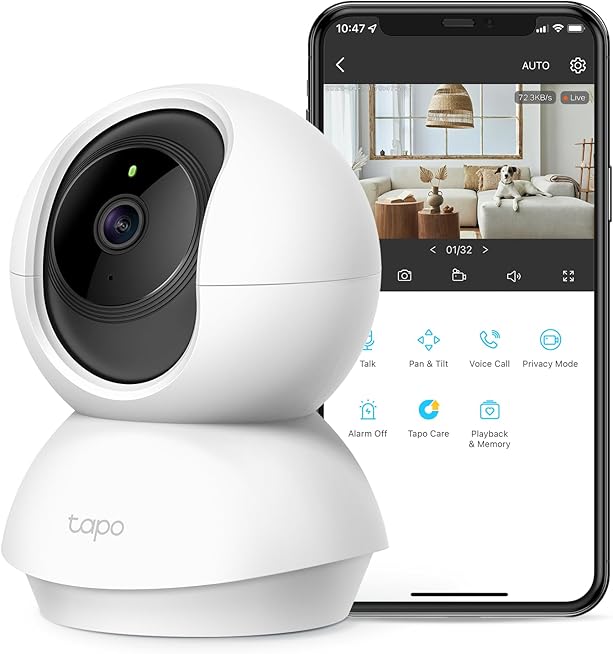
The TP-Link Tapo C210 is a strong illustration of what the budget-to-midrange tier now offers. On paper it records 2K (3MP, 2304 x 1296) video, motorized pan and tilt gives it a 360-degree horizontal and roughly 114-degree vertical field of view so it can sweep a whole room, and infrared night vision reaches up to about 30 feet in the dark. It includes two-way audio through a built-in mic and speaker, motion detection, and a microSD slot that accepts cards up to 256 GB. It connects on 2.4 GHz Wi-Fi and works with both Alexa and Google Assistant.
The important part is how you choose to store footage. Cameras like the C210 let you record locally to a microSD card, which keeps your video in your own home and off any subscription, or use an optional cloud plan for off-site backup. For privacy-minded beginners, local recording plus a strong, unique password is the combination to reach for. Physically aim indoor cameras at entryways and shared spaces rather than bedrooms and bathrooms, and if the camera supports a privacy mode or a physical way to disable it when you are home, use it. A camera you trust is one whose data path you actually understand.
Upgrade 3: A robot vacuum (automation you feel every day)
Nothing sells the idea of a smart home faster than coming back to clean floors you did not sweep. A robot vacuum is the first “smart” device many people genuinely miss when it is gone, because the benefit is physical and daily rather than abstract.
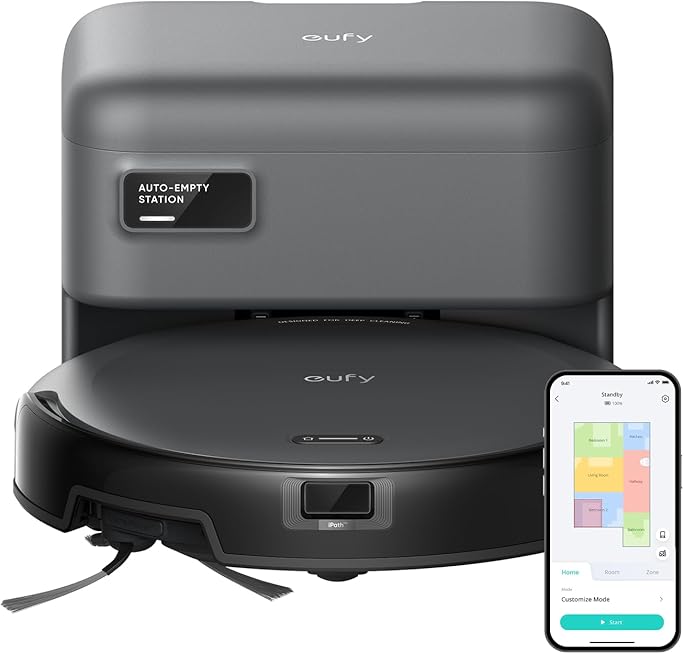
The eufy RoboVac 11S MAX is a well-known entry-level pick, and its specs explain the appeal. It uses 2000 Pa of suction with eufy’s BoostIQ feature, which automatically ramps power up when it detects thicker carpet, and an ultra-slim body just under three inches tall (about 2.85 inches) so it can slide under couches and beds that taller robots cannot reach. Runtime is rated up to roughly 100 minutes on hard floors, after which it returns to its dock to recharge. Infrared obstacle sensors and drop sensors keep it from bumping hard into furniture or tumbling down stairs.
It is worth setting expectations honestly: the 11S MAX is a “bump and roll” navigator, not a laser-mapping robot. It cleans in a semi-random pattern rather than building a map of your home, which keeps the price and the app simple, there is no room-by-room mapping here. For apartments, single floors, and anyone who mainly wants floors kept tidy between deeper cleans, that trade-off is exactly right. If whole-home mapping and app-drawn no-go zones are must-haves, that is a reason to step up to a pricier model, but the 11S MAX shows how much value the entry tier delivers.
Upgrade 4: A voice assistant or hub to tie it together
Once you own two or three connected devices, a central controller turns a collection of gadgets into something that feels like a system. For most beginners that controller is simply a smart speaker, an Amazon Echo or a Google Nest, running the voice assistant that matches your phones. It lets you group devices (“turn off downstairs”), build routines (“good night” turns off the lamps and arms nothing you did not ask for), and control everything hands-free.
This is the moment the hub-vs-no-hub decision becomes real. If everything you own is Wi-Fi based, plugs, a camera, a vacuum, a speaker doubling as a voice hub is all you need. If you start adding low-power sensors (door contacts, temperature sensors, motion detectors on Zigbee, Z-Wave, or Thread), a dedicated hub keeps them fast and reliable and off your Wi-Fi. Several smart displays and speakers now include a Matter controller and a Thread radio built in, which is why buying Matter-certified devices pays off later: they slot into whatever hub you eventually choose without being stranded.
Our advice for beginners is to resist buying a hub on day one. Start with Wi-Fi devices and a single voice speaker, learn what you actually use, and add a hub only when your ambitions (or your sensor count) outgrow the simple setup. Buying the box before you need it is the classic way to overspend.
Upgrade 5: Smart lighting to finish the loop
Lighting is where a smart home stops being a gadget collection and starts feeling designed. You have two routes. The simplest is to put ordinary lamps on smart plugs, which you may already own from Upgrade 1, giving you scheduled and voice-controlled on/off. The richer route is smart bulbs, which add dimming and, on color models, adjustable warmth and color, all from the app or a voice command.
Beginners should match their bulbs to the ecosystem they have already started. If your plugs are Kasa and your speaker is an Echo, Kasa or another Alexa-friendly bulb line keeps everything in one or two apps rather than five. Set warm, dim “evening” scenes and brighter “morning” scenes, tie them to sunset or a routine, and you get the single most satisfying everyday payoff in home automation for very little money. If a bulb line is Matter-certified, so much the better for future flexibility. This is the upgrade that makes the whole investment feel worthwhile.
Privacy and security: the rules that keep it safe
A connected home is only as trustworthy as the accounts and network behind it. None of this is complicated, but skipping it is how people end up with a genuinely bad day.
- Use a unique, strong password for every smart-home account, and turn on two-factor authentication where it is offered, especially for anything with a camera. Reused passwords are the number-one way home cameras get hijacked.
- Keep the apps and device firmware updated. Security fixes arrive through those updates, and most apps can install them automatically.
- Prefer local storage when it is offered. A camera that records to a microSD card keeps footage in your home; use cloud plans as an optional backup, not a default.
- Place cameras thoughtfully, entryways and shared rooms, not bedrooms or bathrooms, and use privacy or off modes when you are home.
- Consider a guest Wi-Fi network for gadgets. Putting inexpensive smart devices on a separate network keeps them walled off from your phones and computers.
A sensible first shopping list
If you want a concrete starting point rather than a shelf full of boxes, this is a realistic sequence for a first-time buyer. Begin with a two-pack of smart plugs such as the Kasa Smart Plug Mini to learn the ropes and automate a couple of lamps. Add one indoor camera like the TP-Link Tapo C210 for peace of mind, with local recording enabled. Bring in a robot vacuum such as the eufy RoboVac 11S MAX for the daily payoff of clean floors. Then, and only then, add a single voice speaker to tie routines together, followed by smart bulbs once you know which rooms you actually automate.
Every one of these steps is reversible, inexpensive, and independent, you can stop at any point and still have a home that does something useful. That is the real secret to smart-home success for beginners: start small, buy for a problem you actually have, keep your accounts locked down, and let the system grow one satisfying upgrade at a time.